What is M30 in CNC Programming

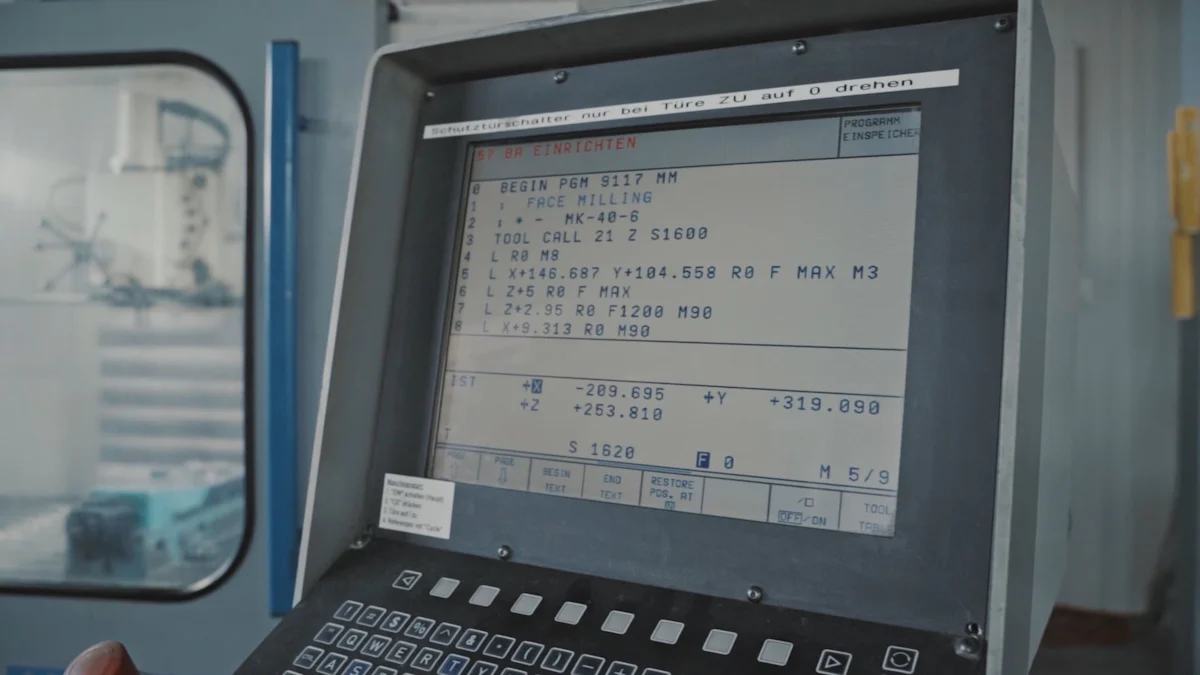
CNC programming is vital in today's manufacturing landscape, enabling machines to execute precise tasks with minimal human input. In this domain, M-codes are crucial commands that manage different machine functions. Notably, the M30 code is significant as it concludes a program and resets the CNC machine to its initial state, preparing it for the next task. This feature ensures efficiency and seamless continuity in machining operations, underscoring the importance of comprehending M30 in CNC programming.
Understanding M30 in CNC
Definition of M30
The M30 code plays a crucial role in CNC programming. It signifies the end of a program and resets the CNC machine to its starting point. This action prepares the machine for the next task or inspection. By doing so, M30 ensures that the machine is ready for subsequent operations without manual intervention. This feature enhances the efficiency of CNC machines, allowing them to perform tasks seamlessly.
Function of M30 in CNC programming
M30 serves as a reset command in CNC programming. When executed, it stops the machine, turns off the spindle, and can deactivate coolant systems. This command not only ends the current program but also rewinds the G-code file back to the beginning. This function is essential for preparing the machine for the next job, ensuring a smooth transition between tasks.
How M30 differs from other M-codes
M30 stands out from other M-codes due to its unique ability to reset the program. While other M-codes, such as M02, may end a program, they do not reset the machine to its initial state. M30's capability to rewind the program to the start distinguishes it from other codes, making it indispensable in CNC operations.
Historical Context
Evolution of M-codes in CNC
M-code programming has its roots in the mid-20th century. During this period, manufacturing transitioned from manual to automated processes. M-codes became an integral part of CNC machines, providing data for various machine actions. These codes enabled CNC machines to perform tasks like tool changes and coolant flow autonomously. This evolution marked a significant shift in manufacturing, paving the way for modern CNC programming.
Development of M30
The development of M30 reflects the advancements in CNC technology. As CNC machines evolved, the need for efficient program management became apparent. M30 emerged as a solution, offering a reliable method to end programs and reset machines. This development contributed to the automation and efficiency of CNC operations, highlighting the importance of M30 in modern manufacturing.
Importance of M30
Role in CNC operations
The M30 code plays a pivotal role in CNC operations. It serves as a command that concludes a program and resets the machine, ensuring readiness for the next task. This dual function is crucial for maintaining the efficiency and continuity of CNC machining processes.
Ending a program
M30 signifies the end of a CNC program. When executed, it halts the machine's operations, ensuring that the current task is completed. This command is essential for signaling the conclusion of a machining process, allowing operators to prepare for subsequent tasks without manual intervention. By ending the program, M30 ensures that the machine does not continue running unnecessarily, which can prevent potential errors or damage.
Resetting the machine
In addition to ending a program, M30 resets the CNC machine to its initial state. This reset function is vital for preparing the machine for the next operation. By returning the machine to its starting point, M30 eliminates the need for manual adjustments, enhancing the overall efficiency of CNC operations. This automatic reset feature distinguishes M30 from other M-codes, which may not offer the same level of convenience and automation.
Benefits of using M30
The use of M30 in CNC programming offers several benefits that contribute to the efficiency and safety of machining operations.
Efficiency in operations
M30 enhances operational efficiency by automating the end-of-program process and resetting the machine. This automation reduces downtime between tasks, allowing CNC machines to operate continuously with minimal human intervention. The ability to quickly transition from one task to another without manual resets increases productivity and optimizes the use of CNC machinery.
Safety considerations
Safety is a critical aspect of CNC operations, and M30 contributes significantly to this area. By ensuring that the machine stops and resets at the end of each program, M30 minimizes the risk of accidents caused by unexpected machine movements. This command also turns off the spindle and can deactivate coolant systems, further enhancing safety measures. Operators can rely on M30 to maintain a safe working environment, reducing the likelihood of errors and ensuring the protection of both personnel and equipment.
Structure of M-codes
General structure of M-codes
M-codes, integral to CNC programming, dictate machine functions. They complement G-codes, which control motion. Understanding their structure is crucial for effective CNC operations.
Syntax and format
M-codes follow a straightforward syntax. Each code begins with the letter "M" followed by a numerical value. This format allows machines to interpret commands efficiently. For instance, M30 signifies the end of a program and resets the machine. The simplicity of this syntax ensures ease of use and reduces the likelihood of errors during programming.
Common M-codes in CNC
Several M-codes are frequently used in CNC programming. These include:
M00: Program stop
M01: Optional stop
M02: End of program
M03: Spindle on (clockwise)
M05: Spindle stop
M08: Coolant on
M09: Coolant off
Each code serves a specific function, contributing to the overall efficiency and safety of CNC operations.
Specifics of M30
The M30 code holds particular significance in CNC programming. It not only ends a program but also resets the machine, preparing it for the next task.
How to implement M30
Implementing M30 in a CNC program is straightforward. Programmers insert the M30 command at the end of the G-code sequence. This placement ensures that the machine stops and resets after completing the current task. By doing so, M30 facilitates a seamless transition to subsequent operations, enhancing productivity.
Examples of M30 in use
In practice, M30 proves invaluable across various CNC applications. Consider a scenario where a CNC machine produces multiple parts in a single run. At the end of each cycle, M30 halts the machine and resets it, readying it for the next batch. This automatic reset eliminates the need for manual intervention, streamlining the production process.
"Most programmers use M30 and never use M02," highlighting its widespread adoption due to its efficiency and reliability.
Practical Examples
Real-world applications of M30
Case study 1
Automated Part Production in a Manufacturing Plant
In a bustling manufacturing plant, operators rely heavily on CNC machines to produce automotive parts. The M30 code plays a pivotal role in their operations. After each production cycle, the machine executes the M30 command. This action halts the machine, resets it, and prepares it for the next batch of parts. By automating this process, the plant minimizes downtime and maximizes productivity. The seamless transition between tasks ensures that the production line operates efficiently, meeting the high demands of the automotive industry.
Case study 2
Precision Tooling in Aerospace Engineering
Aerospace engineering demands precision and accuracy. In this field, CNC machines equipped with the M30 code excel. Engineers program the machines to manufacture intricate components for aircraft. Upon completing each component, the M30 command stops the machine and resets it. This automatic reset ensures that each new task begins with the machine in its optimal state. The reliability of M30 in resetting the machine enhances the precision of the tooling process, which is crucial for maintaining the high standards required in aerospace engineering.
Troubleshooting common issues
Common errors with M30
Operators occasionally encounter errors when using the M30 command. One common issue involves the machine not resetting properly after executing the command. This problem can arise from incorrect programming or machine malfunctions. Another frequent error occurs when the machine fails to stop completely, leading to potential safety hazards.
Solutions and tips
To address these issues, operators should first verify the accuracy of the G-code sequence. Ensuring that the M30 command is correctly placed at the end of the program can prevent many errors. Regular maintenance of CNC machines also plays a crucial role in avoiding malfunctions. Operators should routinely check for software updates and perform diagnostic tests to ensure the machine functions correctly. Additionally, training sessions for operators can enhance their understanding of CNC programming, reducing the likelihood of errors and improving overall safety.
Safety and Tools
Safety considerations when using M30
Precautions to take
Operators must prioritize safety when using the M30 command in CNC programming. Ensuring that the machine stops completely after executing M30 is crucial. Regularly inspect the machine for any malfunctions or wear and tear. Proper training for operators can prevent errors and enhance safety. Experts emphasize the importance of understanding the specific M-code for the CNC machine being used.
Best practices
Adopting best practices ensures safe and efficient CNC operations. Operators should always verify the G-code sequence before running a program. Routine maintenance checks help keep machines in optimal condition. Implementing a checklist for safety procedures can further minimize risks. Experts recommend maximizing M-Codes’ potential by converting them into manufacturing wonders.
Tools and software for CNC programming
Recommended tools
Several tools can enhance CNC programming efficiency. Precision measuring instruments ensure accurate machining. High-quality cutting tools improve performance and longevity. Experts suggest using reliable tool holders to maintain stability during operations.
Software options
Various software options support CNC programming. CAD/CAM software assists in designing and generating G-code. Simulation software allows operators to test programs before execution, reducing errors. Popular choices include Mastercam, Fusion 360, and SolidWorks. These tools streamline the programming process and enhance productivity.
Comparison to Related Concepts
M30 vs. other M-codes
Differences and similarities
M30 stands out among M-codes due to its specific function of ending a program and resetting the CNC machine to its initial state. This command ensures the machine is ready for the next task. In contrast, other M-codes, like M02, also end programs but do not reset the machine. M30's ability to rewind the program to the start makes it unique.
M30: Ends the program and resets the machine.
M02: Ends the program without resetting.
Both codes signal the conclusion of a CNC program, but M30 offers additional functionality by preparing the machine for subsequent operations.
When to use each code
Operators should choose between M30 and other M-codes based on their specific needs. Use M30 when a reset is necessary to prepare for the next task. This ensures efficiency and readiness. Opt for M02 if the program simply needs to end without resetting the machine. Understanding these differences helps in selecting the appropriate code for each situation.
M30 in different CNC machines
Variations across machines
The implementation of M30 can vary depending on the CNC machine. Different manufacturers may define M-code functions uniquely. While M30 generally ends the program and resets the machine, some machines might have additional features or requirements.
Standard Function: Ends program and resets.
Manufacturer Variations: May include additional commands or specific reset behaviors.
Adaptations needed
Operators must adapt to these variations by consulting the machine's manual. Understanding the specific requirements and capabilities of each machine ensures proper use of M30. Regular training and updates on machine specifications can help operators effectively implement M30 across different CNC systems.
FAQs
Common questions about M30
What happens if M30 is not used?
When operators omit the M30 code in a CNC program, the machine does not automatically reset to its initial state. This omission can lead to several issues:
Program Continuation: The machine may continue running or remain in its current state, which could cause errors or damage if not manually stopped.
Manual Intervention: Operators must manually reset the machine, increasing downtime and reducing efficiency.
Safety Risks: Without the automatic stop and reset provided by M30, there is a higher risk of accidents due to unexpected machine movements.
The M30 code ensures that the machine halts and resets, preparing it for the next task. This automation enhances both safety and efficiency in CNC operations.
Can M30 be used in all CNC machines?
The M30 code is widely used across various CNC machines, but its implementation can vary depending on the machine's manufacturer and model. Here are some considerations:
Standard Functionality: Most CNC machines recognize M30 as a command to end the program and reset the machine.
Manufacturer Variations: Some machines may have additional features or specific requirements for using M30. Operators should consult the machine's manual to understand these variations.
Compatibility: While M30 is generally compatible with most CNC systems, older or specialized machines might require different codes or adaptations.
Operators should verify the specific capabilities of their CNC machines to ensure proper use of M30. Regular training and updates on machine specifications can help operators effectively implement this code across different systems.
M30 plays a crucial role in CNC programming by marking the end of a program and resetting the machine to its starting point. This function ensures the machine is ready for the next task, enhancing efficiency and safety in operations. Understanding M30's significance allows operators to optimize CNC processes effectively. As technology evolves, mastering such codes becomes increasingly important. For those eager to deepen their knowledge, exploring additional learning resources can provide valuable insights into CNC programming and its applications.
See Also
Achieving Precision with CNC Milling for Parts Manufacturing
Resolving Challenges: NC Milling and CNC Engraving for Best Outcomes
Unveiling Facts: Precision Parts CNC Machining Process Programming
Perfecting Precision: Guide to CNC Programming and Machining
About US
Follow Us
Your prototype holds unparalleled significance, and we deeply value its uniqueness. Collaborating with you during the preparation phase for running your prototype or parts is a commitment we gladly embrace. Whether it's a single part or a complex assembly, we are dedicated to selecting the optimal tools and pathways to bring your envisioned product to life.
At Precision Fab CNC Machining, we specialize in producing parts for prototypes, short runs, and high-volume production. Our prototyping machine capabilities extend across metal, plastic, and wood machining, with welding fabrication services available to complement and finalize your prototype if required.
Address
Address: Room320 10F, Building A,Nanshan international building, Dayawan District, Huizhou, Guangdong, 516001 China
Contacts
billy@timaycnc.com